 Bisrat Shibeshi
Format a cover letter as a one-page business letter. Put your contact details at the top, then the date, the employer's details, a greeting, three to five paragraphs and a sign-off with your name. Use 10 to 12 point type, single spacing with a blank line between paragraphs, everything aligned to the left, and margins between half an inch and an inch.
| Element | Format |
|---|---|
| Length | One page |
| Paper | US Letter in the US and Canada, A4 almost everywhere else |
| Font | 10 to 12 point, the same font as your resume |
| Margins | Half an inch to an inch (about 1.3 to 2.5 cm) |
| Spacing | Single-spaced, with a blank line between paragraphs |
| Alignment | Left-aligned, with no indents and no justified text |
| File | PDF, unless the employer asks for something else |
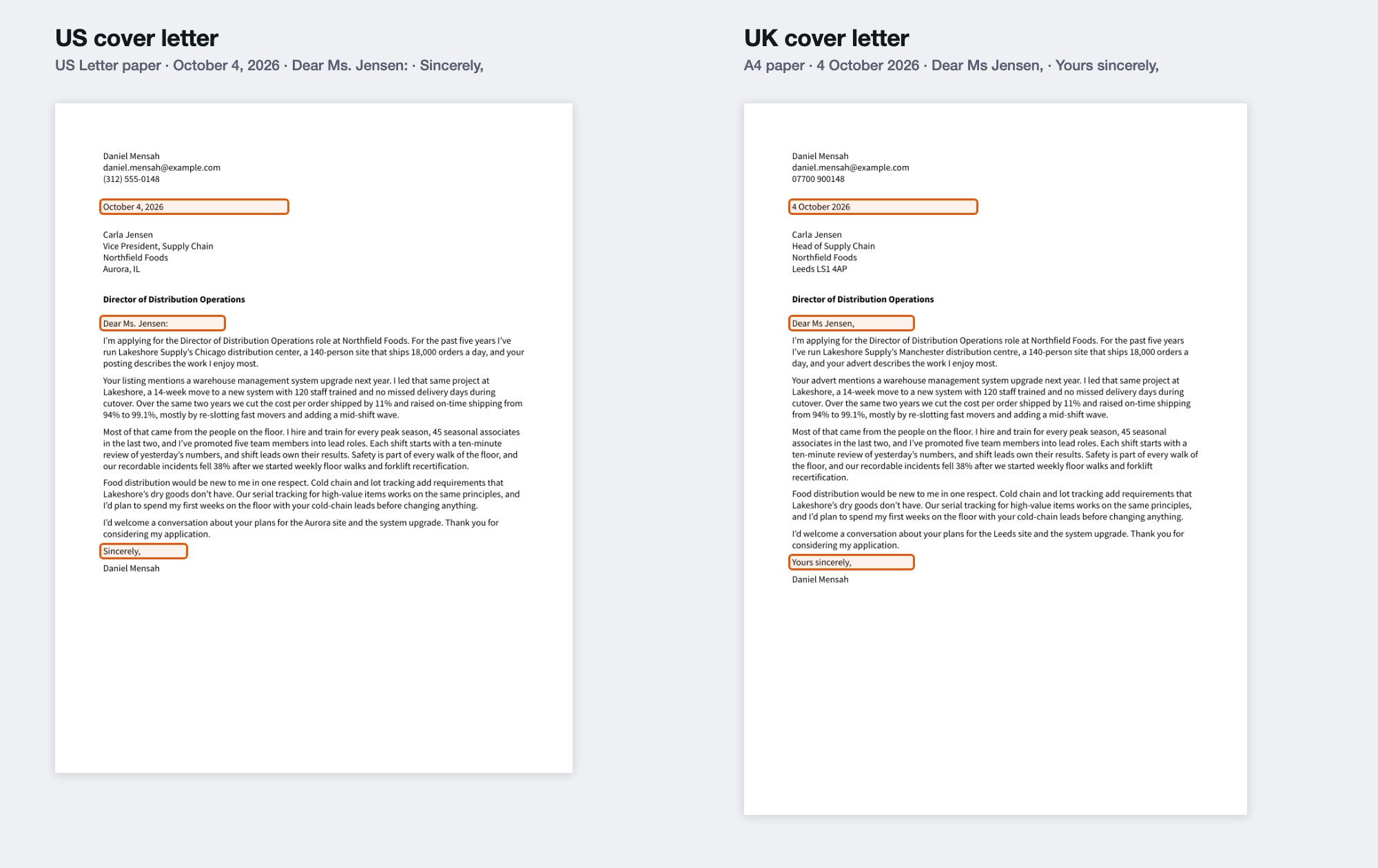
The parts are the same in the US and the UK, but a few details change, including the date, the greeting and the sign-off. Below is one letter set out both ways.
What goes in a cover letter, in order?
Eight parts, from your details at the top to your name at the bottom. Here's a cover letter from a fictional operations manager, Daniel, in standard US format.
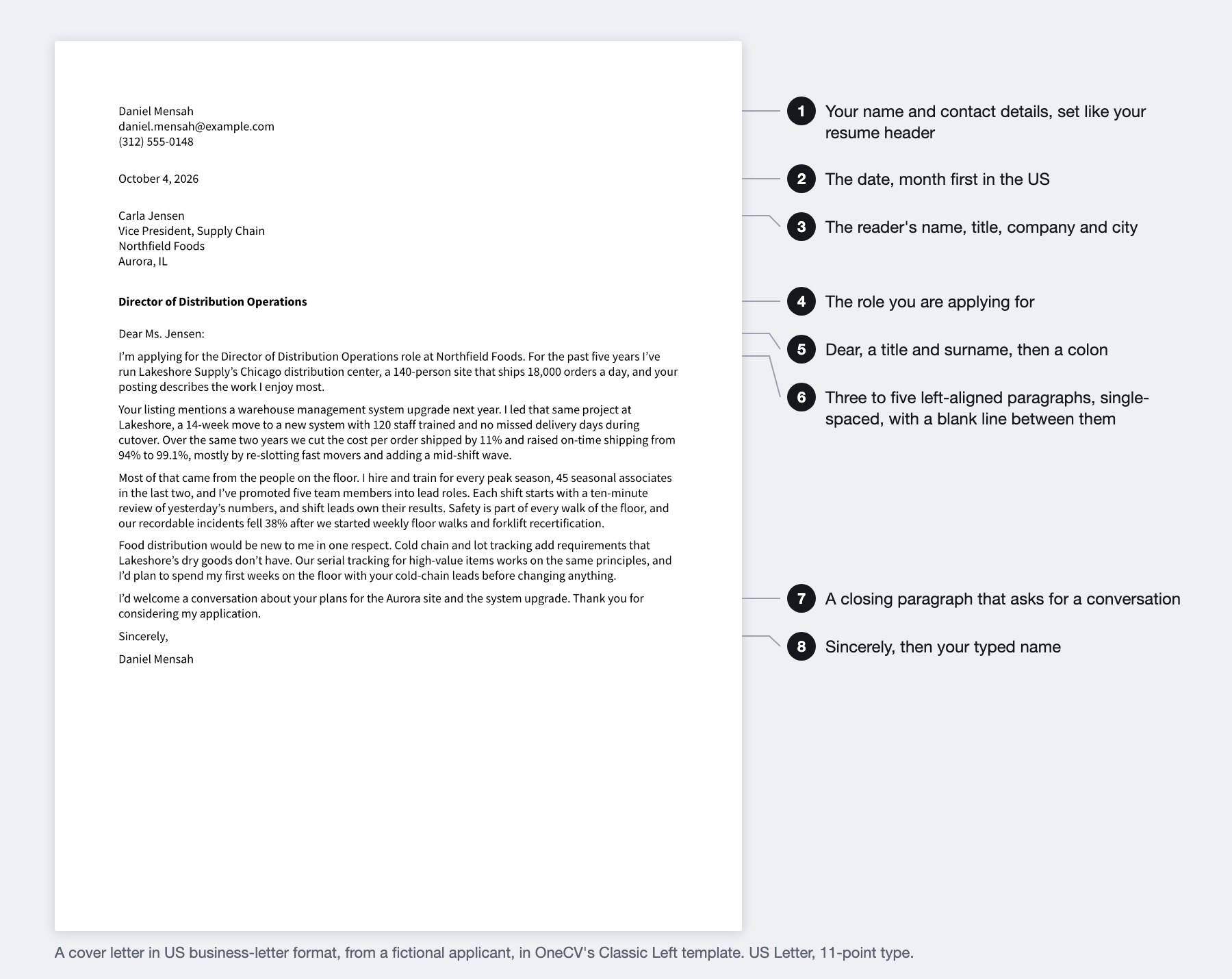
- Your name and contact details. UC Berkeley's career office recommends the "same format style as your resume, including the header with your contact information", so the two documents look like a pair.
- The date you send it.
- The reader's name, job title, company and city. In an online application this block is optional, and Prospects' own sample letter leaves it out.
- A subject line with the role. MIT's career office also asks you to include the job's reference number if it has one.
- The greeting, using the reader's name when you can find it.
- The body, three to five paragraphs. The first names the role and why you want it, and the middle ones give your evidence. Our guide to cover letter length covers how much fits.
- A closing paragraph that asks for a conversation.
- A sign-off and your name.
This layout, with every line starting at the left margin, is called block format. Purdue's writing lab also describes modified block, where the date and the sign-off start at the center of the page. Both are correct, and block format is simpler to set up.
How should a cover letter be spaced?
Single-spaced, with one blank line between paragraphs. Purdue describes a business letter as "left justified and single spaced except for a double space between paragraphs".
Keep everything on the left margin. Georgetown's career center says "Don't indent your paragraphs", and Cambridge's careers service says "Don't use justified alignment". Justified text stretches each line to both margins, which leaves uneven gaps between words.
What font, size and margins should a cover letter use?
Use the font from your resume, at 10 to 12 point. MIT gives 10 to 12 point, and Michigan's career center says "using the same font as your resume". Cambridge suggests "pt 10 or pt 11" for UK letters.
Set margins between half an inch and an inch. Michigan says ".5 to 1 inches", and Purdue says one inch is standard but you can go down to about 0.7 inch if you keep all sides even. If your letter only fits with tiny margins, shorten the text instead.
Our guide to the best font for a resume covers which fonts to choose.
How do you address a cover letter?
Use the reader's title and surname, such as "Dear Ms. Jensen". Purdue suggests using the full name, such as "Dear Pat Thompson", when you aren't sure of the title someone uses.
If you can't find a name, MIT suggests "Dear Hiring Manager". Michigan advises against "To whom it may concern". In the UK, the National Careers Service suggests "Dear Sir or Madam" as the fallback.
In US business letters, a colon follows the greeting. Purdue says to use a colon after the salutation, "never a comma", and Georgetown's sample greetings use colons too. UK letters use a comma or no punctuation at all.
How is a UK cover letter formatted differently?
The parts and order are the same, but five details change. Here's Daniel's letter set out for a US employer and for a UK one.
| Detail | US | UK |
|---|---|---|
| Paper | US Letter | A4 |
| Date | October 4, 2026 | 4 October 2026 |
| Titles | Mr., Ms., Dr. | Mr, Ms, Dr |
| After the greeting | A colon | A comma, or nothing |
| Sign-off | Sincerely | Yours sincerely to a named person, Yours faithfully after "Dear Sir or Madam" |
The sign-off follows a rule in the UK. The National Careers Service says to end with "Yours sincerely" if you know the reader's name, and "Yours faithfully" if you wrote "Dear Sir or Madam". Prospects gives the same rule.
UK sources don't state a rule for the date, but their sample letters put the day first, as in Cambridge's "14 January 2017". Use A4 paper, as our A4 vs US Letter guide explains, and use UK spelling in the body.
How do you format a cover letter for an email?
Put the letter in the body of the email unless the posting asks for an attachment. UNC's career office says to "include the cover letter in the text of your email and attach the resume, unless instructed otherwise", and Michigan and Prospects say the same.
Never send attachments with an empty email. Cambridge warns that "emails that are sent with attachments but no text are likely to be marked as spam". If you attach the letter, save it as a PDF, as Prospects advises.
You don't need a handwritten signature for an online application. Georgetown says "you don't need to include a signature" online, and UNC says "an electronic signature is not expected". Type your name under the sign-off.
How to format a cover letter in OneCV
OneCV's cover letter builder lays out the parts for you, in the order above.
- Fill in the Recipient details, Date and Subject sections on the Write tab. The date can be custom text, so you can write it the US or the UK way.
- To match your resume, use Copy resume design in the Design tab. It copies your resume's font, colors, header and spacing to the letter.
- Choose A4 or US Letter under Page Format in Document Settings.
- The Font size card runs from 10 to 14 point, and the Spacing card sets the line height and margins.
The Free plan includes one cover letter alongside one resume, with all 70 letter templates and unlimited PDF downloads with no watermark. For what to write in each paragraph, see our guide to writing a cover letter with no experience, which works for any applicant.
Frequently asked questions
Should a cover letter be single-spaced?
Yes. Purdue's writing lab describes business letters as single-spaced with a blank line between paragraphs. Double spacing would push most letters onto a second page.
Do I need the employer's address on a cover letter?
It's traditional for a mailed letter and optional for an online application. Prospects' sample cover letter leaves it out. If you know the reader's name and title, including them still shows you've done the research.
Should I indent the paragraphs?
No. Georgetown's career center says to align all text on the left margin and not indent paragraphs. A blank line between paragraphs shows where each one starts.
Colon or comma after "Dear"?
A colon in the US, as in a business letter. Purdue says to use a colon after the salutation. UK letters use a comma or no punctuation.
Do I sign a cover letter I send online?
Type your name under the sign-off. Georgetown and UNC both say a signature isn't needed for an online application.
What's the difference between "Yours sincerely" and "Yours faithfully"?
Use "Yours sincerely" when you've addressed someone by name, and "Yours faithfully" when you've written "Dear Sir or Madam". It's a UK rule. In the US, "Sincerely" works for both.
Create your free OneCV account and format your cover letter to match your resume.