 Bisrat Shibeshi
Some software reads a two-column resume in the wrong order, and the kind of layout matters more than the number of columns. We drew one resume in all 105 of OneCV's templates and read every PDF back with four text extractors. Two columns under a full-width header broke most often. A sidebar holding your contact details did much better. Even plain one-column layouts slipped when the dates sat on the right.
Text extractors aren't an applicant tracking system (ATS), and no employer's system was part of this test. Turning the PDF into plain text is usually a parser's first step, though. If the text comes out in the wrong order, a parser has to fix it before it can file your experience in the right fields. We also tried a commercial resume parser on three of the layouts, and it read all three correctly. Below is what each tool did, what ATS makers say about columns, and how to check your own file in a minute.
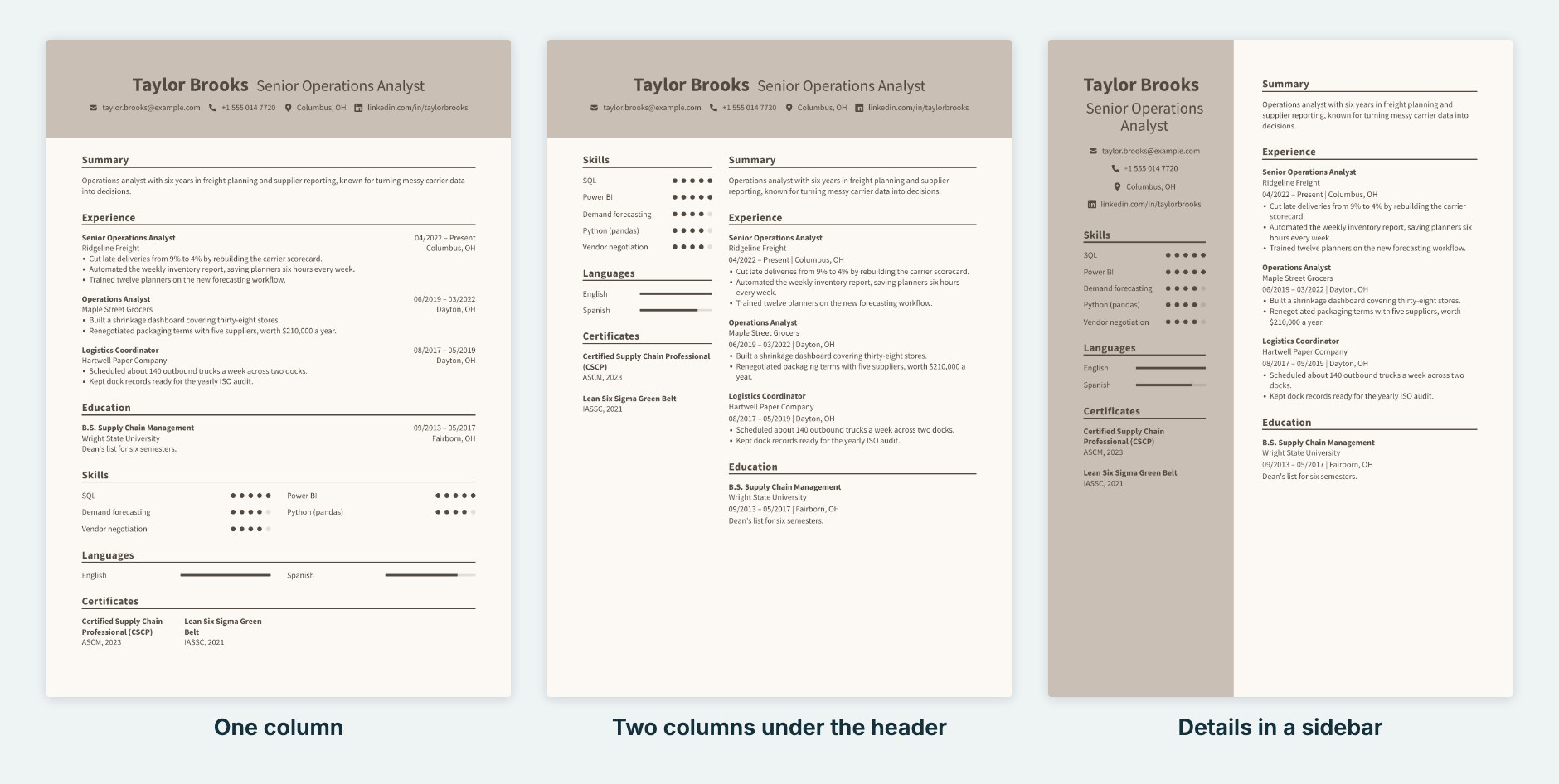
What we tested
We wrote a short fictional resume for an operations analyst, with a summary, three jobs, education, skills, languages and certificates. We drew it in every OneCV template and saved each one as a PDF, using the same drawing code and Chrome print settings as OneCV's Download button. Then we read every PDF back with four free tools:
- pdf.js, which many browser-based resume checkers use
- pypdf, a common Python library
- Poppler's pdftotext, a long-standing command-line tool
- pdfminer.six, another widely used Python library
A script checked each result for five problems:
- Another section's text landed inside a job.
- A section came out in pieces.
- A heading was followed by the wrong section's content.
- An item from a list, such as one skill, moved somewhere else.
- A job's dates ended up away from that job.
A result with none of them counts as clean.
What the four extractors read
| Layout | Templates | pdf.js clean | pypdf clean | pdftotext clean | pdfminer clean |
|---|---|---|---|---|---|
| One column | 64 | 64 | 64 | 35 | 10 |
| Two columns under a full-width header | 20 | 20 | 20 | 3 | 3 |
| Two columns, contact details in a sidebar | 17 | 17 | 17 | 7 | 16 |
| One column, contact details in a sidebar | 4 | 4 | 4 | 3 | 4 |
pdf.js and pypdf read all 105 templates in order, two-column ones included. pdftotext and pdfminer are where it went wrong, and the most serious failure was a job broken up by another section's text. pdfminer did that in 9 of the 20 templates with two columns under a full-width header, and pdftotext in 2. No sidebar template had a broken job in any of the four tools.
Here is what pdftotext read from the middle version in the image above, with two columns under the header:
Skills

Summary

SQL

Operations analyst with six years in freight planning and supplier
reporting, known for turning messy carrier data into decisions.

Power BI
Demand forecasting
Python (pandas)
Vendor negotiation
The "Skills" and "Summary" headings sit side by side at the top of each column, so the tool read across them. The summary ended up inside the skills list. A parser that files text under the heading above it could put the summary under Skills.
What a commercial parser did with the same files
Text extraction is only the first step, so we also uploaded the three versions in the image at the top to Affinda's free resume parser, a commercial service that needs no account. Affinda read each column as a block, putting the whole sidebar or left column before the main column. It filed every part correctly in all three versions. Each came back with the summary, all three jobs with their employers, dates and bullet points, the degree, both languages, both certificates and the contact details.
That's one parser and three files, so it doesn't show what any particular ATS does. It shows that a parser built to find columns can read a well-made two-column PDF. The two extractors that failed in our test place text by its position on the page, and you can't tell which kind of parser an employer's system uses.
Why the same PDF reads differently in each tool
A PDF stores text in the order the program that made it wrote it out, and also stores where on the page each line goes. Some tools read the text in the order it was written. Others rebuild the order from where each line sits on the page.
pdf.js and pypdf take the first approach. OneCV writes one column after the other, so they got every template right. pdftotext and pdfminer take the second approach and have to work out where one column ends and the next begins. pdfminer handled a tall sidebar running down the page well. Both struggled most when two headings sat on the same line, which happens when two columns start together under a full-width header.
Most ATS vendors don't say how their parsers put text in order. The safest file is one that reads in order whichever approach is used.
Even one-column resumes have small columns
Many one-column templates put each job's dates on the right, opposite the job title, and lay out skills in a grid of two or three columns. To an extractor that works from position, those are columns too. pdfminer moved dates away from their jobs in 36 of the 64 one-column templates. In Classic Clear, it gathered every date into one block above the Experience heading. pdftotext moved an item out of a list in 16.
We tried two settings on two one-column templates. The first put the dates and location on the line below each job title. The second showed skills, languages and certificates as rows. With both changes, both templates came out clean in all four extractors. Each change on its own left a problem in at least one extractor.
What ATS and parser makers say about columns
Greenhouse is the only big ATS we found whose product help names columns. Its help page lists "Resumes that have a columned layout" among formatting issues that "may result in a partial resume parse that will need to be manually corrected and verified." The same page says that when a resume can't be parsed, the file stays attached to the candidate. A failed parse means a recruiter sees fewer filled-in fields. Greenhouse doesn't say the application is rejected.
Textkernel, whose parser SAP SuccessFactors names in its own help, is blunter. Its parser documentation says that when it finds columns, "We rearranged this data to be machine readable with greater accuracy. It is a HUGE MISTAKE for candidates to represent data in columns rather than in a simple top-to-bottom, all-across-the-page format." Textkernel estimates that "at least 15% of CV documents use a column layout." It reports that a 2023 upgrade to its column handling took well-rendered CVs "from 62% to 90%" on about 700 test CVs. That leaves room for errors even in a parser built to handle columns.
Workday's administrator guide says only that "Resume parsing results can vary based on resume format and order of words." Lever, Oracle and iCIMS publish nothing on columns that we could find, though much of their documentation sits behind customer logins.
What careers services and the US government advise
Public advice is consistent. The US Department of Labor's 2026 employment workshop guide says "Never break your whole resume into columns or tables, as they often cause errors." The University of Waterloo tells future students to "organize the information on your résumé into one wide, easy-to-read column."
Some careers services draw a line between software and people. The University of Oregon's business careers office says "A two-column resume enhances readability for human reviewers but may not be as effective for Applicant Tracking Systems (ATS)." Utah Valley University says "two-column resumés will work fine if you are emailing the resume directly to a recruiter or hiring manager."
Does a two-column resume cost you interviews?
No published study we found runs one-column and two-column resumes through named ATS products and compares the results. The closest thing to outcome data comes from Huntr, a job tracker that also sells a resume builder. In its analysis of 94,338 applications, "Two-column resumes reached interviews on 6.2% of applications, compared with 5.7% for single-column resumes. The difference did not persist when we compared applications from people who used both layouts." The data shows what users chose and what happened next, so it can't separate the layout from everything else about each application.
Several resume sites quote precise accuracy figures for one column against two, such as 93% against 86% or 98% against 95%. We couldn't trace the first to any published test. The second names no parser, sample size or scoring method. Treat both with care.
How to check your own resume
- Open your PDF, select all the text, copy it, and paste it into a plain text editor such as Notepad or TextEdit in plain-text mode.
- Read it from the top. Each heading should be followed by its own content. Each job title should stay with its dates and bullet points.
- Look for the patterns from our test. Two headings may sit together, a summary may have landed in a list, or the dates may appear in a block of their own.
Copy and paste uses your PDF viewer's own extractor, so it shows one tool's view. Our free ATS resume checker adds a Reading order check. It flags text set in side-by-side columns and dates stored away from their jobs, and its Across the page view shows how a position-based reader would mix your columns. The PDF is read in your browser and never uploaded.
If your text comes out in the wrong order, the simplest fix is one column with the dates under each job title. If you want to keep two columns, put the contact details and short lists in a sidebar, keep jobs and education in the main column, and check the result again. Our Google Docs resume test found the same problem in Google's two-column Serif template, which builds its columns from a hidden table.
When a two-column resume is fine
A two-column layout reads well to people. If you're emailing your resume to a recruiter, handing it over at a career fair, or attaching it as an extra document next to a one-column version, the columns are a matter of taste. The risk is in online application forms, where software reads the file before anyone sees it, and you can't tell which parser that is.
If you apply both ways, keep two versions of the same content. A one-column copy goes to online forms, and a two-column copy goes to people.
How to set this up in OneCV
In OneCV's resume builder, the layout is a setting, so you can switch your existing resume between layouts without retyping anything.
- Open your resume and go to the Customize tab.
- In the Layout card, choose One under Columns. To keep a sidebar, choose Two and set Header Position to Left or Right.
- In the Entry Layout card, choose Full Width under Structure, then set Date & Location Position to Below Title.
- Under Section Customizations, set Skills, Languages and Certificates to Rows.
- Download the PDF and run it through the ATS resume checker.
These settings made two one-column templates read cleanly in all four extractors in our test. Most of our simple resume templates are already one column. The Free plan includes one resume, so on Free you'd switch the layout and download each version in turn. Pro keeps a one-column copy and a two-column copy side by side.
Frequently asked questions
Can an ATS read a two-column resume?
Often it can, but not always in the right order. In our test, two of four text extractors mixed up most two-column layouts that sat under a full-width header, while a commercial parser, Affinda, filed every field correctly in one-column, two-column and sidebar versions of the same resume. Greenhouse lists a columned layout as a cause of partial parses, and Textkernel's parser documentation says it rearranges columns and calls using them a mistake. No ATS vendor publishes how its parser reads a two-column PDF.
Is a resume with a sidebar ATS-friendly?
It held up better than other two-column layouts in our test. pdfminer read 16 of 17 sidebar templates cleanly, and no sidebar template had a job broken up by other text in any tool. pdftotext's output still had a problem in 10 of the 17, so check yours before you apply online.
Is a one-column resume always safe?
No. Dates set on the right of each job and skills laid out in a grid act like small columns. One of our extractors moved dates away from their jobs in more than half of the one-column templates. Dates on the line below each job title, and lists shown as rows, fixed it in our test.
Should I use a one-column resume for online applications?
If you can't check how your file reads, yes. The US Department of Labor and the careers services we read in the US, UK, Canada and Australia all advise a single column for online applications. A two-column version is fine to email to a person.
How do I check whether my resume reads in the right order?
Copy all the text from your PDF into a plain text editor and read it from the top, or run the file through a checker that shows reading order. Each heading should be followed by its own content, and each job title should stay with its dates and bullet points.