 Bisrat Shibeshi
Google Docs is a perfectly good place to write a resume, and it's free. University careers services at SJSU, Berkeley, Wellesley and UT Dallas all tell students to write their resume in Word or Google Docs. The catch is in the templates. Two of Google's five resume templates get their two-column look from a hidden table, a layout that Greenhouse, one of the big applicant tracking systems, says its parser can misread. All five were US Letter size in our tests, and the one we opened in an account set to UK English still started at Letter.
A resume builder takes the layout off your hands. You type into fields, and the builder handles spacing, page size and the design, so switching templates doesn't mean rebuilding the page. To see the difference in practice, we built the same resume in Google Docs and in OneCV and read both PDFs back with three text extractors.
Can you make a resume in Google Docs?
Yes. Google says you can use "Google-created templates like resumes, budgets, and order forms", which you reach by opening Docs and clicking Template gallery. The gallery has five resume templates.
| Template | Layout | Built from a table? |
|---|---|---|
| Swiss | Section labels in a left column, content on the right | Yes, a borderless table |
| Serif | Main column with a narrow sidebar for skills, awards and languages | Yes, a borderless table |
| Coral | One column | No |
| Spearmint | One column | No |
| Modern Writer | One column | No |
None of the five puts your contact details in a page header or footer, which matters because headers are another place parsers can miss text. In our test files, every template was US Letter. If you're applying in an A4 country, change it under File, Page setup, and use Set as default so new documents start at A4. Our A4 vs Letter guide shows which countries use which.
You can download a finished Doc as PDF, Word (.docx), OpenDocument, Rich Text, plain text, HTML, EPUB or Markdown.
Are Google Docs resumes ATS-friendly?
The single-column templates are. The table-based ones carry a risk. Applicant tracking system vendors don't say anything about Google Docs specifically, but Greenhouse publishes a list of layouts its parser struggles with. It includes "Complex resumes with tables, headers, and footers" and "Resumes that have a columned layout", which "may result in a partial resume parse that will need to be manually corrected". Penn's careers service warns that "Not all applicant tracking systems can read decorative formatting like tables, shapes, graphics, images, etc.", and SJSU tells students to avoid "headers, footers, columns, text boxes, tables, and graphics".
The file itself is fine. Greenhouse, Lever, iCIMS and Oracle Taleo all accept both PDF and Word, and Greenhouse and iCIMS let candidates attach a resume straight from Google Drive. A PDF from Google Docs has real, selectable text, which is what Lever says a parser needs. Lever's own check is simple: "If you cannot highlight text, the document is likely not parseable".
We built the same resume in Google Docs and OneCV
We wrote a resume for a fictional PhD graduate applying for a data scientist job, then built it twice. In Google Docs we used the Serif template from the gallery, since it's one of the two table-based designs, and replaced its placeholder text with the resume. In OneCV we used the Classic Clear template. Both are one page on US Letter, with the same words.
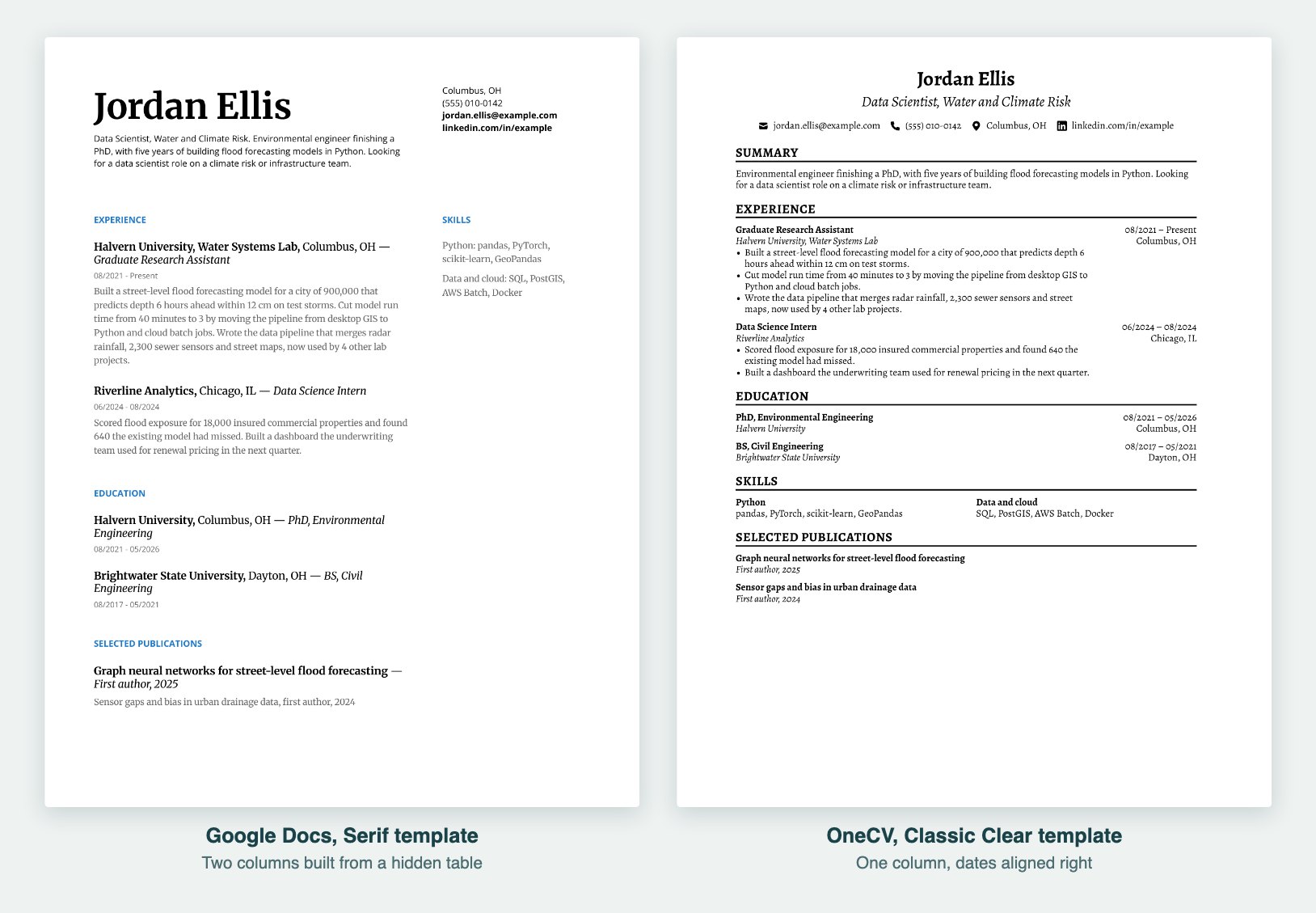
Then we pulled the text out of each PDF with three common tools: pdf.js, the PDF engine in Firefox and the one our free ATS resume checker uses; pdftotext, from the Poppler library; and pypdf, a Python library. None of these is an ATS, and no vendor publishes which extractor its parser uses, so treat them as three different ways a parser might read your file.
| Extractor | Google Docs, Serif | OneCV, Classic Clear |
|---|---|---|
| pdf.js | Every word. The left column came out first, then the skills column | Every word. Each job's dates came out after its first bullet |
| pdftotext | Every word, but the skills column was mixed into the first job, line by line | Every word. Dates came out after each job's bullets, and the second skills group moved to the end |
| pypdf | "fi" and "fl" came out as single ligature characters, so a search for "flood" found 0 of the 4 on the page | Every word. "flood" found 4 of 4 |
The pdftotext result is the one to look at. Because Serif is a table, the tool read across both columns at once, and the skills ended up inside a sentence about flood forecasting:
EXPERIENCE
SKILLS
Halvern University, Water Systems Lab, Columbus, OH —
Graduate Research Assistant
Python: pandas, PyTorch,
08/2021 - Present
Data and cloud: SQL, PostGIS,
Built a street-level flood forecasting model for a city of 900,000 that
AWS Batch, Docker
predicts depth 6 hours ahead within 12 cm on test storms.
A parser that reads a file this way can file your skills under the wrong job, or miss them. The ligature result matters in a different way. In our file it affected seven words, including "first" and "five", and a keyword search on text like pypdf's misses them even though they're plainly on the page.
OneCV's PDF wasn't perfect either. Its dates and locations sit in a right-hand column of each entry, so two of the tools read them after the bullets, and pdftotext moved the second half of the skills grid to the bottom of the page. No words were lost or broken in any tool. We later ran the same kind of check on all 105 OneCV templates in our two-column resume test, which shows the settings that made two templates read cleanly in every tool. You can check how your own PDF reads, from any tool, in our ATS resume checker.
What tripped us up in Google Docs
Three things caught us out while building the Docs version.
- The template opened at US Letter. Our Google account is set to UK English, the gallery labels its row "CVs" and Page setup shows centimetres, but the Serif template still opened at Letter (21.6 × 27.9 cm). Anyone applying outside North America has to switch it to A4 by hand.
- A blank second page appeared. Docs always keeps an empty paragraph after a table, and once our content filled the table, that paragraph spilled onto page 2, so the PDF would have had a blank second page. Setting that empty paragraph's font size to 1 pulled it back.
- Placeholder text is easy to miss. The template's sections don't match a real resume one to one, so we had to delete a third job, the education descriptions, Awards and Languages. Greenhouse notes that its parser skips obvious placeholder data, but a stray line of filler text still looks careless to a person.
Two more things are worth knowing before you send a Docs resume. Google's Word export embeds the full font files, so our research found Serif's .docx was 1.59 MB against 57 KB for the PDF. That's under LinkedIn's 2MB recommendation and Greenhouse's 2.5MB parsing limit, but it's big for one page. And if you share your resume as a Docs link, Google says "your name and email will be visible as the owner of that file", and the link only opens for people you've given access to unless you set it to "Anyone with the link".
Should you send a PDF or a Word file?
Follow the job posting first. When it doesn't say, US advice and UK advice point in different directions. US careers services and USAJOBS mostly recommend PDF. In the UK, LSE says "When in doubt, a Word document is the safer option for ATS compatibility", and Bristol calls Word "generally the most reliable choice unless an employer specifically asks for a PDF". Our guide to PDF or Word has the test results behind our advice. From Google Docs, use File, Download and pick the format.
When is Google Docs the better choice?
Google Docs is the better fit when:
- you want control over every line, spacing and font, and don't mind setting them yourself
- a careers adviser or mentor is going to comment on your draft, since Docs comments and suggestions are built for that
- your university publishes its own Google Docs template, as UT Austin and Harvard do
- you only need one resume, in one country's format, and won't change the design
A resume builder is the better fit when:
- you want to try different designs without rebuilding the page each time
- you apply in more than one country and need A4 and Letter versions
- you keep several versions for different kinds of jobs
- you'd rather not manage tables, spacing and page breaks
Careers services don't agree about builders. UT Dallas says "Do not use a template (or resume builder)", while USAJOBS, Canada's Job Bank and the UK's Department for Work and Pensions each run a free builder of their own. Our guide to whether resume builders are worth it covers what they cost and what to watch for, including builders that charge only when you try to download.
How to move a Google Docs resume into OneCV
You don't have to retype it.
- In Google Docs, choose File, Download, PDF document (.pdf).
- In OneCV, choose Import resume on your Resumes page and drop in the PDF. OneCV reads it in your browser and turns your sections, dates, bullets and links into entries you can edit. The Free plan includes three imports.
- Check the dates and bullets once, then pick any of the 105 templates. After that you can change template without retyping as often as you like.
- Set Page Format under Customize to A4 or Letter for the country you're applying in, and download the PDF.
The Free plan includes one resume and downloads it as a PDF with no watermark. Keeping several versions side by side needs Pro, at $10 a month or $48 a year. More detail is on our import page.
Frequently asked questions
Does Google Docs have resume templates?
Yes, five, in the Template gallery: Swiss, Serif, Coral, Spearmint and Modern Writer. Swiss and Serif are built on tables, and the other three are a single column. In our UK-English account the gallery row was headed "CVs", but the templates were the same five.
Which Google Docs resume template is best for ATS?
One of the single-column templates: Coral, Spearmint or Modern Writer. They have no tables and keep everything in the body of the page, which is what careers services and Greenhouse's parsing notes recommend.
Is Google Docs free for resumes?
Yes. Anyone with a Google account can use Docs and its templates, and downloading a PDF costs nothing.
Should I send my resume as a Google Docs link?
Only if the employer asks for a link. Otherwise attach a PDF, or a Word file if the posting asks for one. A shared link shows your name and email as the owner, depends on its sharing settings, and keeps changing if you edit the Doc after sending it.
Can I edit a Google Docs resume offline?
Yes, in Chrome or Edge, with the Google Docs Offline extension turned on and outside private browsing, according to Google's help.
Write it wherever you're comfortable, then check the layout and the page size before you send it. Create your free account to import your Google Docs resume into OneCV and try it in a single-column template.