 Bisrat Shibeshi
Send your resume as a PDF unless the job posting or the recruiter asks for a Word document. The big applicant tracking systems accept both, and in our test a text-based PDF and a Word file each gave back every one of the resume's 375 words. The file to avoid is an image-only PDF, such as a scan or a photo of your resume, which gave back none.
| Your situation | What to send |
|---|---|
| The posting names a format | That format |
| An online application with no format given | A PDF |
| A US federal job on USAJOBS | A PDF of 5 MB or less, which USAJOBS recommends |
| A recruitment agency wants your CV | A Word document, if they ask for one |
| You only have a scan or a photo | Rebuild it as a text document first |
The rest of this guide covers what the systems' makers say, what our test showed, where the "never send a PDF" advice came from and when Word is the better choice.
Can applicant tracking systems read PDF resumes?
Yes. Every major applicant tracking system whose file list we could find puts PDF next to Word in its own documentation.
| System | Formats it documents for resumes | Size limit |
|---|---|---|
| Greenhouse | .doc, .docx, .pdf, .rtf, .txt | Uploads up to 100 MB, parsed up to 2.5 MB |
| Lever | Word, PDF, RTF, WordPerfect, HTML, OpenOffice | Not stated |
| Workable | .pdf, .doc, .docx, .rtf, .html, .odt | 5 MB |
| Oracle Taleo | .pdf, .doc, .docx, .rtf, .txt and others, as set by each employer | 1 MB by default |
| iCIMS | pdf, doc, docx and dozens more, for text extraction | Not stated |
What these companies name as a problem is images. Lever says it "cannot parse information from image files". Greenhouse's list of failed parses starts with "resumes that are uploaded as an image, rather than a document (such as a .docx or .pdf)", and puts PDF and Word on the same side. Oracle's Taleo Business Edition notes say "the resume will not be parsed when it is in an image format".
The US government's job site goes further. USAJOBS says "we recommend saving and uploading your resume as a PDF to maintain formatting and number of pages".
What did our test of PDF, Word and a scanned copy show?
Both text-based files gave back every word, and the image-only PDF gave back nothing. We took a fictional operations manager's resume, Daniel's, with 375 visible words, and saved it three ways.
- A PDF from OneCV, in the one-column Classic Clear template, printed by Chrome with the same settings OneCV's PDF download uses.
- A Word document (.docx) with the same text, made with macOS's built-in converter.
- An image-only PDF, made by turning each page of the first PDF into a 200 dpi picture, the way a scanner would.
Then we pulled the text back out with two independent tools for each format and checked every word against the original. For the PDFs we used pdf.js, the PDF engine in Firefox, and Apple's PDFKit. For the Word file we used macOS's textutil and read the document's XML directly.
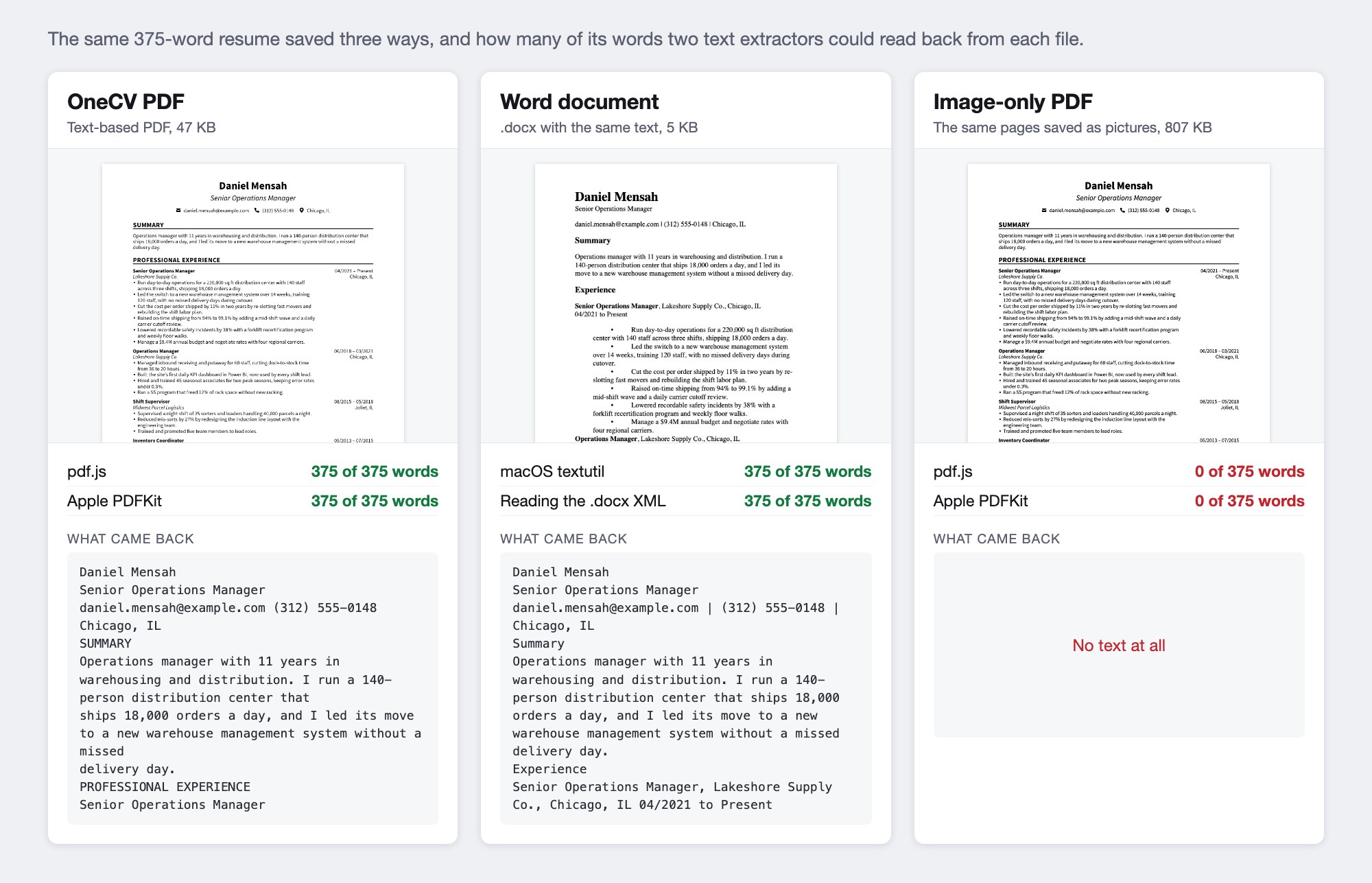
| File | Size | Words read back, first tool | Words read back, second tool |
|---|---|---|---|
| OneCV PDF (text) | 47 KB | 375 of 375 (pdf.js) | 375 of 375 (PDFKit) |
| Word document | 5 KB | 375 of 375 (textutil) | 375 of 375 (XML) |
| Image-only PDF | 807 KB | 0 of 375 (pdf.js) | 0 of 375 (PDFKit) |
The PDF also kept the resume in order. Each job's dates and city came back inside that job's text, next to its title and bullets.
These tools aren't applicant tracking systems, and each system uses its own parser. They do show what a parser has to work with. A text-based PDF or Word file hands it the words, and an image hands it a picture.
Can OCR rescue a scanned resume?
Partly. OCR, or optical character recognition, turns a picture of text back into text. Some systems run it on scanned resumes, often as an extra. Textkernel, which makes resume-parsing software for recruiting companies, offers OCR as an add-on and says that "images take considerably longer to parse".
We ran Apple's built-in OCR on our image-only PDF. It read 372 of the 375 words, but it also made the kind of mistakes a parser can't see.
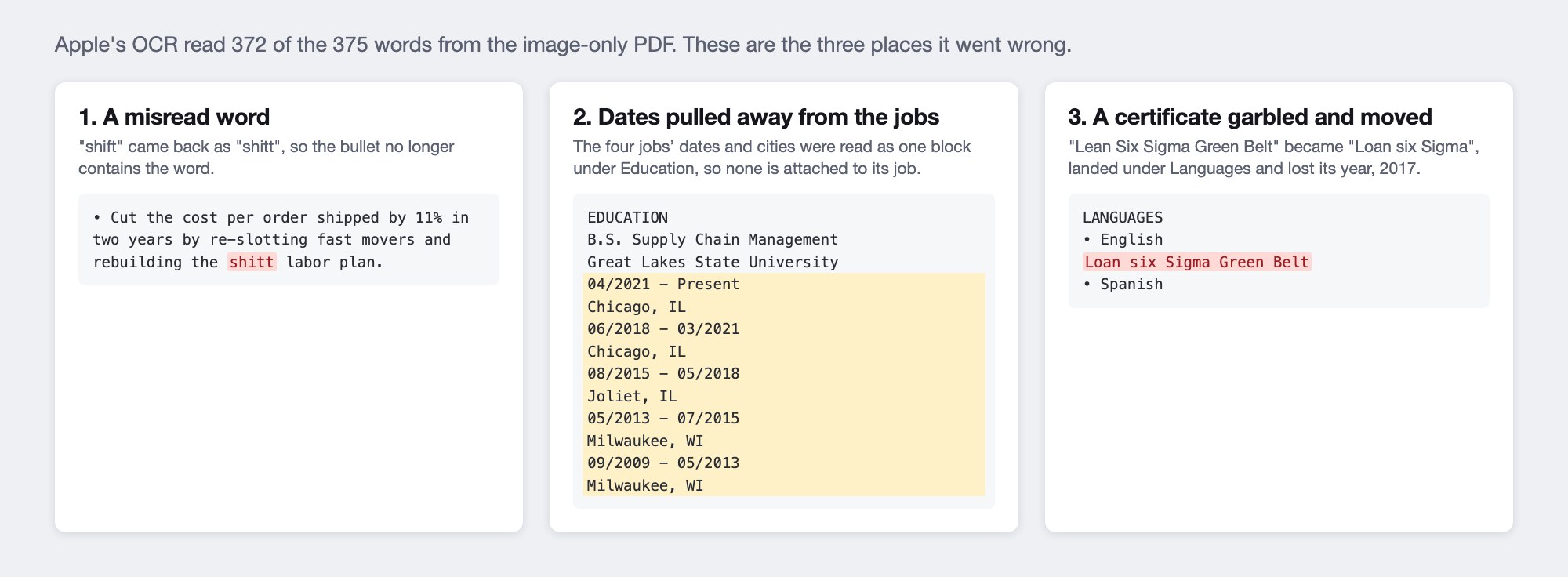
The misread word is the smallest problem. The OCR read the dates column separately from the jobs, so every date range and city ended up in one block under Education. A parser that matches each job to its dates would have nothing next to the job titles. Apple's OCR isn't what an applicant tracking system uses, but the lesson holds. A scan depends on how well OCR reads it, and a text-based file doesn't.
Where does "ATS can't read PDFs" come from?
From the resume-parsing industry itself, years ago. In 2004, Sovren, a resume-parser company that is now part of Textkernel, published tips for job seekers that said "do not save your resume as HTML, PDF, WordPerfect or RTF". Its 2011 version was blunter: "Never use PDF for your resume. Read that again: never use PDF for your resume." It called PDF a "broken" standard and said text couldn't be extracted correctly from many PDF files.
Some of that advice survives. Textkernel's developer documentation still tells companies building on its parser that "if you want to minimize conversion problems, don't use PDF documents", and blames most failed parses on corrupt PDF files. SmartRecruiters' glossary suggests .docx "for maximum parsing compatibility", and Columbia's career site says to "use/submit MS Word documents (not PDFs)".
Against that, the systems' own help pages list PDF as a format they read, the US government recommends PDF, and MIT's career office says "it is usually fairly safe to use either a .doc/.docx or .pdf file type". A PDF saved from Word, Google Docs or a resume builder contains real text. The trouble comes from damaged files and images.
When should you send a Word document?
When the employer or recruiter asks for one. Prospects, the UK careers site, notes that some job adverts state .pdf while others ask for .docx, and MIT says to "pay close attention to the requested file type listed in the ATS".
Recruitment agencies are the most common case. The staffing firm Adecco explains that "recruiters often need to change your resume prior to sending it to a client to add the staffing company's logo, format it the way the client requires, or remove your contact information". A PDF makes that harder, so an agency may ask for Word even when its own system reads PDFs.
Don't send both versions to the same application. Send the one that's asked for, or a PDF if nobody says.
How big can a resume file be?
Smaller than you might think, depending on the system. Greenhouse accepts uploads up to 100 MB but can't parse a resume larger than 2.5 MB. Workable and USAJOBS cap resumes at 5 MB, Oracle Taleo's default limit is 1 MB, though each employer can change it, and Ashby only searches and autofills from resumes of 16 MB or less.
A text-based resume is far below all of these. Our OneCV PDF was 47 KB and the Word file 5 KB. The image-only copy of the same two pages was 807 KB, and a phone photo of a resume can easily pass 1 MB.
How to check that your PDF can be read
Try to select the text. Lever's help center calls this "a simple test". If you can highlight the words with your cursor, the file contains text, and if you can't, it's most likely an image.
Then copy everything and paste it into a plain text editor, such as Notepad or TextEdit in plain text mode. Check that your name and contact details came through, and that each job's dates sit near its title. MIT suggests the same kind of check by saving your resume as a plain text file.
Greenhouse also lists contact details placed in a page header, footer or text box among the causes of failed parses, so keep your name, email and phone number in the main body of the page.
PDF or Word in OneCV
OneCV's resume builder downloads a text-based PDF, on every plan and with no watermark. Your name and contact details are ordinary text on the page, and everything can be selected and copied. OneCV doesn't export Word files.
If an employer insists on Word, you can open the PDF in Microsoft Word, which converts it into an editable document. Microsoft says this "works best with PDFs that are mostly text" and that "lines and pages may break at different locations", so check the layout before you send it.
Going the other way, if your current resume is a Word file, save it as a PDF and use Import resume to bring the text into OneCV, then pick from all 105 templates. Our guide to the best font for a resume tested 35 fonts in the same way as this post, and none of them stopped the text from being read.
Frequently asked questions
Is PDF or Word better for an ATS?
Either works for the systems we checked, as long as the file contains real text. Greenhouse, Lever, Workable, Oracle Taleo and iCIMS all list both. Follow the posting if it names a format.
Can an ATS read a scanned resume?
Often not. Lever, Greenhouse and Taleo Business Edition all say image files or image-only resumes won't parse. Some systems run OCR, but in our test even good OCR misread words and moved dates away from their jobs.
Why do some people say never to send a PDF?
The advice goes back to resume-parser makers in the 2000s. Sovren told job seekers in 2004 and 2011 not to use PDF because text was hard to extract from many PDF files. Current help pages from the major systems list PDF as supported.
Do recruiters prefer Word?
Recruitment agencies often do, because they edit resumes before sending them to clients. Adecco says agencies add their logo, reformat the document or remove contact details. Employers hiring directly usually accept either.
Should I send my resume in both formats?
No. Send the format the posting asks for, or a PDF if it doesn't say. Two copies of the same resume only give the reader an extra file to open.
Can I make a Word version of my OneCV resume?
OneCV exports PDF only. Microsoft Word can open the PDF and convert it to an editable document, and Microsoft notes that the line and page breaks may move, so check it before sending.
Create your free OneCV account and download a resume that any system can read.