 Bisrat Shibeshi
For most people, the best resume builder is a free one. A free builder, or a Word or Google Docs template, gives you everything a recruiter looks at. Recruiters read what your resume says, and none of the hiring advice we read suggests they care which tool made it.
Paying makes sense when you'll use what you pay for, such as a tailored version for every application or cover letters that match your resume. Before you pay, check what the trial renews at. Several of the best-known builders charge $1.85 to $2.95 for a trial of 7 or 14 days, then renew at $23.85 to $29.95 every four weeks until you cancel.
| Your situation | What's worth using |
|---|---|
| One resume, and you're comfortable in Word or Google Docs | A free template |
| You want to try several designs without retyping | A free resume builder |
| You'll send many tailored versions or matching cover letters | A builder that keeps several documents, free or paid |
| You're applying through company job portals | Any tool, as long as the layout is a single column |
| You want someone to rewrite your resume | A person, such as your college career office or a mentor in your field |
How much does a resume builder cost?
Resume builders cost anything from nothing to $39 a month. Free tools and free plans cover a single resume. Paid plans run from $10 to $39 a month, and yearly plans from $48 to $199.99. The builders that charge for the download start with a trial of under $3 and then renew at $23.85 to $29.95 every four weeks.
| Tool | How you pay | Price in the US |
|---|---|---|
| Google Docs, Word for the web, Reactive Resume, OpenResume | Free | $0 |
| OneCV | Free plan, or Pro | Free, or Pro at $10 a month or $48 a year |
| Kickresume | Free plan, or a subscription | $24 a month, $54 every 3 months or $96 a year |
| Canva | Free plan, or Pro | US$144 a year for one person |
| Novoresume | Free plan, or Premium | $23.99 a month, $49.99 a quarter or $199.99 a year |
| Enhancv | 7-day free plan, then a subscription | $39 a month, $69 every 3 months or $99 every 6 months |
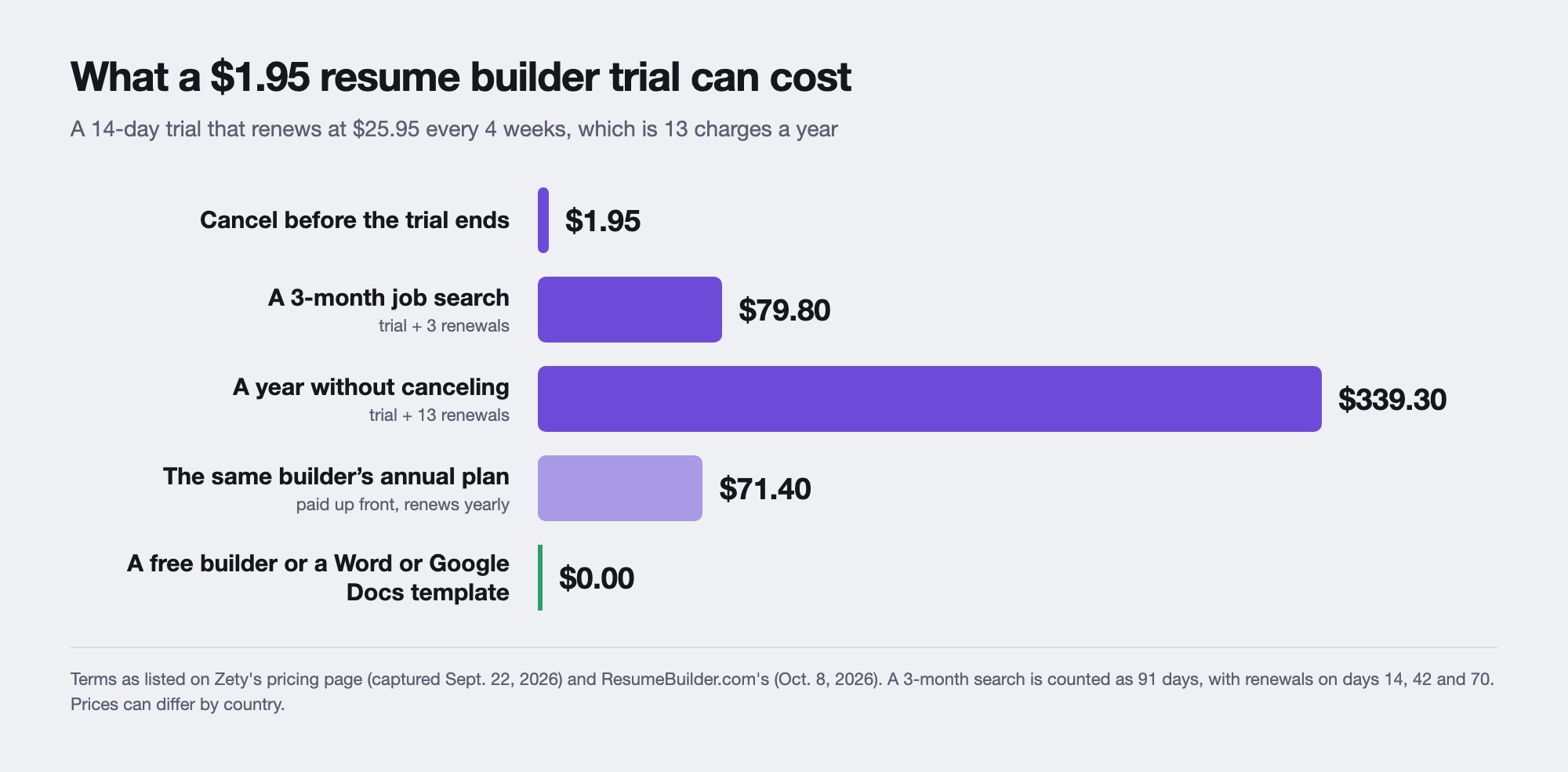
| Zety | Trial, then every 4 weeks | $1.95 for 14 days, then $25.95 every 4 weeks, or $71.40 a year |
| Resume.io | Trial, then every 4 weeks | $2.95 for 7 days, then $29.95 every 4 weeks, or $49.95 a quarter |
These are the prices shown to US visitors, from each builder's pricing page or a US copy of it, checked between July 30 and October 17, 2026. Several builders show lower prices in other countries. Three more trial-based builders are in the renewal table further down. Our list of free resume builders with no watermark covers what each free plan includes.
Why do resume builders cost money?
Most builders let you sign up, pick a template and write your whole resume for free. The charge comes at the download. Zety's terms of use say registered users "will always be able to view and edit these documents, but will not be able to print, download or share unless you have an active Subscription." Resume.io's free plan downloads your resume only as a plain text file, and so do the free tiers of several others.
Other builders charge in different ways. Some let you download free but add a watermark or their logo, some limit you to one resume, and a few sell a one-time payment in place of a subscription. Our list of free resume builders with no watermark shows which ones give free users a clean PDF.
None of this is hidden. The renewal price is printed on each pricing page, right under the trial price. It's easy to miss when you've just spent an hour on your resume and want the PDF.
What a resume builder trial costs after it renews
We read the pricing pages of five well-known builders. All five sell a short, cheap trial that turns into a subscription billed every four weeks.
| Builder | Trial | Then | First year if you never cancel |
|---|---|---|---|
| Zety | $1.95 for 14 days | $25.95 every 4 weeks | $339.30 |
| ResumeBuilder.com | $1.95 for 14 days | $25.95 every 4 weeks | $339.30 |
| Resume.io | $2.95 for 7 days | $29.95 every 4 weeks | $392.30 |
| Resume Genius | $2.95 for 14 days | $23.95 every 4 weeks | $314.30 |
| Resume Now | $1.85 for 14 days | $23.85 every 4 weeks | $311.90 |
Prices are in US dollars, from each builder's pricing page as captured between July 30 and October 8, 2026. They can differ by country. Resume Now also sells a limited trial for $1.45.
Billing every four weeks means 13 charges a year, one more than a monthly plan. The first-year figures are the trial plus 13 renewals.
All of them except Resume.io also sell an annual plan, and that's the "per month" price you often see on their pricing pages. Zety's annual plan is listed at $5.95 a month, but the page says you "Pay $71.40 at once". It's far cheaper than a year of renewals, and it renews every year too. Resume.io sells a quarterly plan for $49.95 instead.
Zety and ResumeBuilder.com list the same prices to the cent. Both are run by Bold, and their privacy policies use the same text.
Can you cancel a resume builder trial?
Yes. The FTC's advice on free trials says, "Before businesses get your credit card information, they have to tell you how to cancel. Businesses must make canceling simple for you. It's the law." The law it means is the Restore Online Shoppers' Confidence Act, which still applies.
A stricter federal rule that would have required a "click to cancel" option is gone, though. The FTC adopted it in 2024, and in July 2025 the Eighth Circuit Court of Appeals vacated it on procedural grounds. In March 2026 the FTC asked for public comment on whether to try again, and as of October 2026 it hasn't proposed a new rule. It says it has received more than 100,000 complaints about these subscriptions in the past five years, across all industries.
Some states go further. In California, for contracts from July 1, 2025, the law says a trial offer must give "a clear and conspicuous explanation of the price that will be charged after the trial ends". A subscription you signed up for online must also be one you can cancel online.
If you start a trial, these steps keep it at the trial price:
- Put a reminder in your calendar two days before the trial ends.
- Download every file you need while the trial is active.
- Cancel from your account settings and save the confirmation email or a screenshot.
- Check your card statement after the renewal date.
- If you're charged after canceling, ask the builder for a refund first. If it refuses, the FTC suggests disputing the charge with your card issuer, which is called a chargeback.
Do recruiters care if you use a resume builder?
None of the sources we read says recruiters care which tool made a resume. What they care about is whether they can read it fast. Alison Green of Ask a Manager says "Most hiring managers spend about 20 seconds scanning a résumé initially", and her advice on design is to "stick to a plain, basic layout". She also says hiring managers "won't care about what font you use as long as you choose one that's easy on the eyes."
The layout matters more when you apply through a company's job portal, which usually runs on an applicant tracking system (ATS). MIT's career office warns that "Canva, LaTeX, online resume builders or other methods might be popular for constructing your resume, but be careful as sometimes these might incorporate formatting that might confound the ATS."
The ATS won't throw your resume away when that happens. Greenhouse, which makes applicant tracking software, says that when a resume can't be read, it "has only been attached to the candidate" and the recruiter has to type your details in by hand. It lists resumes "that have a columned layout" and those with contact details in a header, footer or text box among the ones that fail. A guest post on Ask a Manager traces the claim that an ATS rejects 75% of resumes and calls it "just false". Our guide to what applicant tracking systems actually reject covers the rest.
So pick a single-column template with normal headings, whatever tool you use. To test it, MIT suggests saving your resume as a plain text file and checking that everything comes through in order. Also look at your PDF before you send it. A watermark or a "made with" line from a free plan is the most obvious sign of which tool you used.
Resume builder or a Word or Google Docs template?
A template is enough when you need one resume and you're happy in Word or Google Docs. Google Docs and Word for the web are free with an account. In Google Docs you open the Template gallery and pick a resume, and "A copy of the template opens." Microsoft has free Word templates on Microsoft Create. Harvard's career office offers a plain resume template in Word, Accessible Word and Google Docs that suits a first or early-career resume.
If you go with Google Docs, pick one of its single-column templates. In our side-by-side test of Google Docs and OneCV, the two-column Serif template came out of one text extractor with its skills mixed into the first job.
A builder earns its place in four situations:
- You want to try different designs. In a builder, your content stays the same while the template changes. Our guide to changing your resume template without retyping shows one resume in three designs.
- You edit often and don't want to fight the formatting. A builder reflows the page as you add or cut lines.
- You keep several versions. Duplicating a resume to tailor it to each job is quicker in a builder than juggling Word files.
- You want a cover letter that matches your resume, with the same header and fonts.
Whichever you choose, send a PDF unless the employer asks for a Word file. Our guide to sending a resume as a PDF or a Word document explains why.
What to check before you pay for a resume builder
Run through these questions on the pricing page and the help pages before you enter a card:
- Can you download a PDF on the free plan, and does it carry a watermark or logo?
- What does the trial renew at, and how often? Multiply a four-week price by 13 to see a year.
- Can you cancel online from your account, without calling or emailing?
- Is there a refund window, and does it start from the trial or from the first full charge?
- What happens to your resume when you stop paying? Can you still open it, edit it and download it?
- Can you take your content with you, as a PDF or as text you can paste elsewhere?
- Do the templates you like come in a single column?
Data is the other thing to check, since your resume holds your name, phone number and work history. Our guide to whether online resume builders are safe covers what to look for in a privacy policy.
Is OneCV worth it?
OneCV's Free plan has no time limit and needs no card. It includes one resume, one cover letter, all 105 resume templates and 70 cover letter templates, three imports and unlimited PDF downloads with no watermark. For a single resume, that's everything most people need.
Pro costs $10 a month, or $48 a year, which works out to $4 a month. It adds unlimited resumes and cover letters, the job application tracker, your own domain for your resume and 300 AI writing actions a month. It's worth it if you'll keep a tailored version for each application. If you'll send one resume, it isn't.
The terms are on the pricing page. There's no trial to remember to cancel, because Free doesn't expire. Pro renews automatically until you cancel. You cancel from Settings, where Manage billing opens the billing portal. If you ask within 14 days of a charge, you get that charge back in full. Students who verify a school email get 25% off Pro for the first 12 months.
If Pro ends, every document stays in your account. On Free you can edit and download your first resume and first cover letter, and the rest open again when you upgrade.
OneCV has two limits to know about. It downloads PDFs only, so if an employer asks for a Word file you'll need another tool. Its AI tools are part of Pro and aren't on the Free plan.
Frequently asked questions
How much does a resume builder cost?
From nothing to $39 a month. Google Docs, Word for the web and several builders are free. Paid plans run from $10 to $39 a month, or $48 to $199.99 a year, and trial-led builders such as Zety and Resume.io renew at $25.95 to $29.95 every four weeks after a trial of under $3.
Are resume builders worth paying for?
Only if you'll use what you pay for. A free builder or a Word or Google Docs template covers one resume. Paying makes sense for many tailored versions, matching cover letters or extra tools, and only once you know what the plan renews at.
Why do resume builders charge to download?
Most let you build for free and charge at the download, because that's when you need the file. Zety's terms say free users can view and edit their documents but can't print, download or share them without a subscription. Several free plans download only a plain text file.
Do employers know if you used a resume builder?
Usually not. What can count against you is a layout an applicant tracking system can't read, such as two columns or contact details in a text box. Check your PDF for a watermark or a "made with" line before you send it.
Is it better to use a resume builder or Word?
Word or Google Docs is fine for one resume. A builder is quicker if you want to try several designs, keep tailored versions or match a cover letter to your resume.
How do I cancel a resume builder subscription?
Cancel from your account settings before the trial ends, and keep the confirmation. If you're charged after canceling, ask the builder for a refund, and if it refuses, the FTC suggests disputing the charge with your card issuer.
Is there a resume builder that's actually free?
Yes. Several give free users a PDF with no watermark, and OneCV's Free plan includes one resume, one cover letter and unlimited PDF downloads with no card. Our list of free resume builders with no watermark compares six.
Create your free OneCV account and download your resume as a PDF, with no card and no trial.